



Power BI vs. Excell: Which One Does Your Business Actually Need?
Here’s a clear, practical breakdown to help you choose the tool that matches your business goals and data maturity.

Reporting & Dashboards
Small businesses often struggle to decide whether to stay in Excel or upgrade to Power BI. Here’s a clear, practical breakdown to help you choose the tool that matches your business goals and data maturity.
When Excel Is Enough
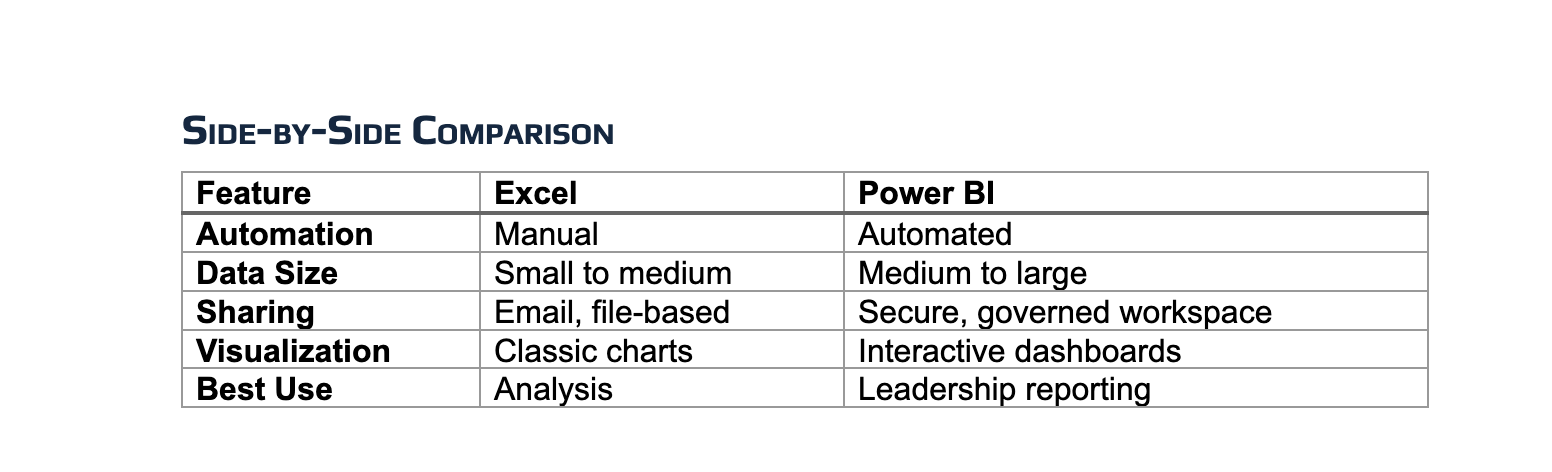
Excel is a powerhouse when you need:
- Fast calculations
- One-time analyses
- Manual data manipulation
- Personal or small-team workflows
Excel = flexibility and exploration.
When Power BI Is the Better Choice
Choose Power BI when you need:
- Automated dashboards
- Real-time insights
- Multi-source reporting
- Role-based or organization-wide sharing
- Visual storytelling for leadership
Power BI = communication and decision-making.
Which Should You Use?
1. Do you need dashboards?
→ Yes: Power BI
→ No: Go to #2
2. Do you need automation?
→ Yes: Power BI
→ No: Go to #3
3. Do you need formulas and flexibility?
→ Yes: Excel
→ No: Go to #4
4. Do you need BOTH dashboards and flexibility?
→ Yes: Power BI + Excel (Hybrid)
→ No: Excel (default lowest-complexity tool)
Need Help Choosing or Transitioning?
Articello Strategies helps small businesses modernize reporting, eliminate manual spreadsheets, and build executive-ready dashboards.
- Book a Free Assessment
Our Latest Insights
Learn how to grow your business with expert advice, practical tools, and fresh perspectives from Articello.